Unwrap Tool
Use this tool to (re)compute unwrap of your model before texturing. You may also find it useful when you want to estimate minimal reasonable resolution, once you have a model calculated. The tool is located in the Color & Texture section of the MESH & COLOR tab.
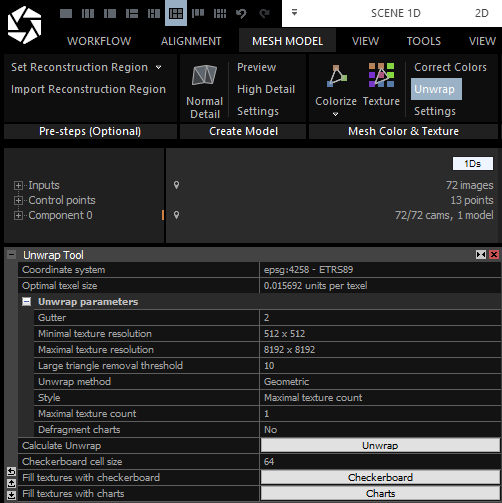
- Optimal texel size Size of a texel corresponding to the smallest detail captured by images.
- Gutter Represents number of pixels of a chart border in a texture image. Gutter is important for avoiding visible artefacts on a model during rendering. Many rendering engines use techniques like mip-mapping, where the texture is downscaled several times to create an image pyramid. If the engine renders texture from higher pyramid levels, then a color from one chart can bleed to another chart in the interpolation process. This can happen just in case you do not have gutter between the charts large enough. The default value 2 is enough to avoid this type of artefact in most rendering engines.
- Minimal texture resolution Set the minimal resolution a texture can be. You can choose from 512x512, 1024x1024, 2048x2048, 4096x4096, 8192x8192 and 16384x16384.
- Maximal texture resolution Set the maximal resolution a texture can be. You can choose from 512x512, 1024x1024, 2048x2048, 4096x4096, 8192x8192 and 16384x16384.
- Large triangle removal threshold Specifies the threshold that controls how large triangles are unwrapped. If a triangle’s edge length multiplied by the specified value exceeds the average edge length of the model, the triangle is mapped to a single texel. For example, setting the value to 400 means that triangles with edges four hundred times longer than the model’s average edge length will be mapped to one texel.
- Unwrap method Defines the unwrap algorithm. Geometric is the legacy unwrap method. Mosaicing based (experimental) is the new method producing fewer UV islands but it is slower than the Geometric method.
- Style Defines a strategy which will be used to build a UV map. Check more about the unwrap styles here
- Defragment charts Enable this setting to create larger UV islands during the unwrapping process using the approach of Maggiordomo, Cignoni, and Tarini (read more).
- Calculate Unwrap Press the Unwrap button to calculate the unwrap and build the UV map.
- Grid size Sets the size of the checkerboard grid pattern. The checkerboard is helpful for previewing seams on the model in the 3D view before texturing.
- Fill with charts Enable this setting to display the UV charts over the UV checker in the 2D view.
- Update checker Update the UV checker to reflect the current settings. If the model was textured without a prior UV unwrap (i.e., the unwrap was generated automatically during texturing), a new UV checker will be created.
- Calculate Unwrap Calculate the UV unwrap. If the model already has an unwrap or an existing texture layer, a new unwrap will be generated.