Render Image
The tool renders and exports an image of the currently selected model as seen in the 3Ds view or from the poses of the selected or all cameras. Even if the model is not displayed due to too many polygons and insufficient GPU capabilities, and only a point cloud or less-detailed texture is displayed, the images will be rendered.
The button for the tool can be found in the Output section of the WORKFLOW tab and it can be used either as a button or as a dropdown menu. When used as a button, it executes the From Current View option, rendering an image of the currently selected 3Ds view. When opened as a dropdown menu, it offers two options: From Current View and From Camera Positions. The From Camera Positions option renders images of the selected model from the camera poses. It uses all cameras if none or only one is selected, or only the selected cameras if multiple are chosen.
From Current View
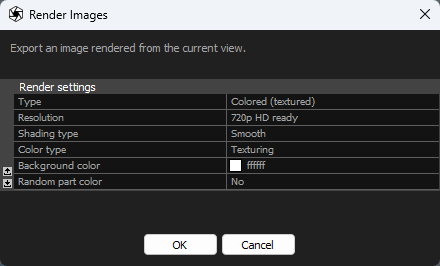
- Type Defines a layout or the rendered image.
- Colored (textured) type is a basic choice for final checks of a model.
- Composite colored (textured) type exports the rendered colored or textured model into an image with a preview of the input image marked as blue in its upper-left corner.
- Shaded type offers you to render a view of the reconstructed model in a monochrome version (shaded version without texture).
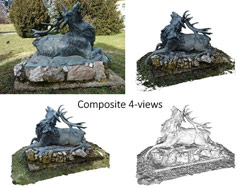
- Composite 4-views type exports these views into a single image: upper-left the input image marked as blue, upper-right as just vertices of the colored or textured model, lower-left as a colored or textured model, and lower-right as a shaded model.
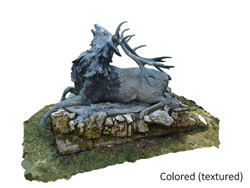
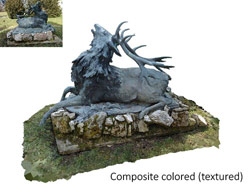
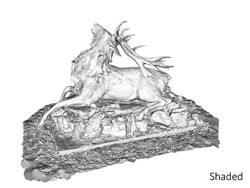
- Resolution Choose the desired size/quality of rendered images.
-
Shading type determines how edges of normals and triangles are rendered.
- Smooth Phong shading with interpolated vertex normals to achieve a smooth-looking surface.
- Flat Phong shading with a single normal per triangle.
- Flat wireframe The same as the flat shading but the renderer also outlines triangle edges.
- Color type defines the source of colors for rendering.
- Coloring uses per-vertex colors of the model. Triangles' faces are colored using a linear combination of its vertices.
- Texturing uses textures calculated from input photos, and triangles are filled with small images. This method is therefore more realistic than coloring.
- Background color defines a color of pixels which have not been rendered. The default color is white. It is possible to choose from a preset palette of colors or choose a custom one.
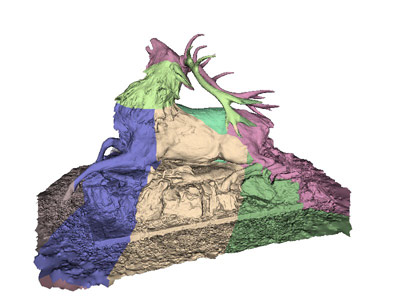
- Enable the Random part color setting when you want to see of how many parts consists your model or just want to get a more artistic output with more colors. This works only with the shaded type render and is most visible in the smooth and flat shading type.
From Camera Positions
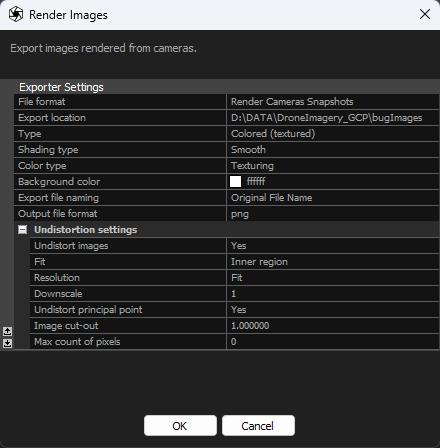
- File Format An informative value about the export file format.
- Export location An informative value about chosen directory where the rendered images will be stored.
- Type Defines a layout or the rendered image.
- Colored (textured) type is a basic choice for final checks of a model.
- Composite colored (textured) type exports the rendered colored or textured model into an image with a preview of the input image marked as blue in its upper-left corner.
- Shaded type offers you to render an image of the reconstructed model in a monochrome version (shaded version without texture).
- Composite 4-views type exports these multiple renders into a single image: upper-left the input image marked as blue, upper-right as just vertices of the colored or textured model, lower-left as a colored or textured model, and lower-right as a shaded model.
-
Shading type determines how edges of normals and triangles are rendered.
- Smooth Phong shading with interpolated vertex normals to achieve a smooth-looking surface.
- Flat Phong shading with a single normal per triangle.
- Flat wireframe The same as the flat shading but the renderer also outlines triangle edges.
- Color type defines the source of colors for rendering.
- Coloring uses per-vertex colors of the model. Triangles' faces are colored using a linear combination of its vertices.
- Texturing uses textures calculated from input photos, and triangles are filled with small images. This method is therefore more realistic than coloring.
- Background color defines a color of pixels which have not been rendered. The default color is white. It is possible to choose from a preset palette of colors or choose a custom one.
- Export file naming defines the naming convention of the exported rendered images.
- Output file format defines the format of the exported images. Choose between PNG and JPG format.
- Undistortion settings Adjust the undistortion settings.
- Undistort images Enable (set to Yes) to undistort exported images.
- Fit Specifies the portion of the undistorted image to include in the output.
- Resolution Sets the image resolution. Selecting Fit or Preserve enables the Downscale settings, while choosing Custom provides options to set Custom width and Custom height.
- Downscale Specify the downscale factor for the images.
- Custom width Specify a custom width for the images.
- Custom height Specify a custom height for the images.
- Undistort principal point Adjust the position of the undistorted image center. Set to Yes to align the optical center with the actual center of the exported image.
- Image cut-out Specify the fraction of the image to be used for undistortion.
- Max count of pixels Set the maximum resolution for the image in pixels. Use zero (0) for no limit.
See also:
- More on how to turn your 3D into color click here