Region Settings
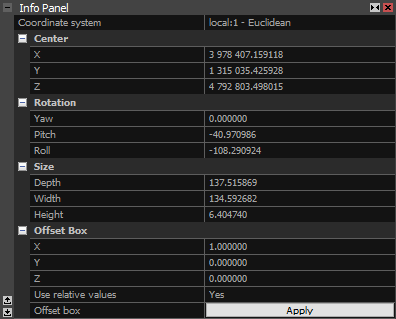
The reconstuction region settings enable you to adjust the region's center coordinate, size and orientation. Using the offset tool, the region can be moved in the space using the relative or absolute values. The settings can be accessed using the Region Settings button in the Reconstruction Region section of the MESH & COLOR tab or in the Scene Alignment section of the SCENE 3D/TOOLS tab.
The available information and tools:
- Coordinate system Useful for all scenes, as it can be used for local-based and georeferenced projects.
- Center The coordinates of the reconstruction region's center in the chosen coordinate system.
- Rotation The yaw, pitch and roll rotatio values of the reconstruction region.
- Size The size of the reconstruction region in the grid units.
- Offset Box A tool for offsetting the region using relative or absolute values. Relative values act as a multiplying factor (offset value times the corresponding size value), while absolute values (when Use relative values is set to 'No') offset the region along the chosen axis using grid coordinates.
See also:
- Learn how to create a reconstruction region here