Trajectory Import
A trajectory file (flight log) is a record of camera poses, orientations, and intrinsics which can be used to georeference your scene and create scaled models.
- First, make sure you have set the project coordinate system to the one in which camera poses are situated. The are found in the Application part of the WORKFLOW tab under Coordinate systems / Project coordinate system.
- Then go to WORKFLOW tab and press the button in the Import Metadata part.
- Trajectory file can also be imported using the command line.
Import Dialog
An import dialog will appear immediately. Let us have a look at the options in the import dialog window:
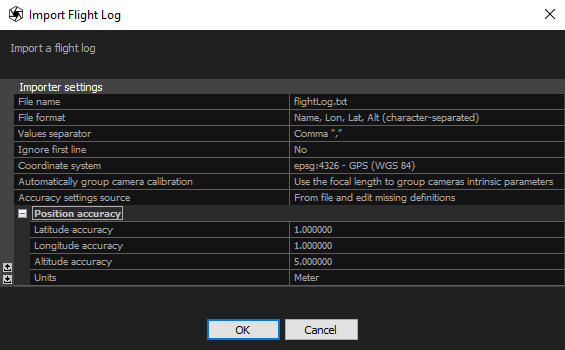
- File name Name of the file containing the camera trajectory information.
- File format Specify values and their order in the file.
- Custom format description Use the available variables to define a custom export format (for example, name x y z omega phi kappa). This option is available when the file format is set to Custom.
- Euler angles order (YPR) Defines the rotation order around the X (Roll), Y (Pitch), and Z (Yaw) axes in the North-East-Down (NED) coordinate system. The rotation order is evaluated from right to left.
- Euler angles order (OPK) Defines the rotation order around the X (Omega), Y (Phi), and Z (Kappa) axes in the East-North-Up (ENU) coordinate system. The rotation order is evaluated from right to left.
- Camera mount Specifies how the camera is mounted relative to the coordinate system of the platform on which it is installed. This option is available when Yaw-Pitch-Roll rotations are included in the file format.
- Camera coordinate system Specifies the convention of the coordinate system axes. This option is available when Omega-Phi-Kappa rotations are included in the file format.
- Values separator - separator used to separate the values found in a trajectory file. Qualifiers are also supported which means that you can place each field in double quotes ("") to signify that it is the same field.
- Ignore first line - if file contains a header, RealityScan can ignore the first line of the file. Lines that begin with symbol # are automatically skipped.
- Coordinate system - define the coordinate system in which the position of the cameras is defined
- Automatically group camera calibration - you can group all cameras from a trajectory file into the same group or assign groups based on the focal length. Alternatively, you can choose not to group cameras.
- Accuracy settings source - from file and edit missing definitions – accuracies from a file are taken and the missing ones are set manually in the Position Accuracy. Global camera priors setting – accuracy for all parameters is defined in the Alignment settings.
-
You can choose from various text file formats provided by RealityScan. Advanced users can easily define their own formats, different values separator, comment symbol or qualifiers by modifying the flightlogs.xml in the application installation folder. You can find the instructions on how to edit the flightlogs.xml as well as the list of supported values for import here.
HINT: Lon - longitude, Lat - latitude, Alt - altitude
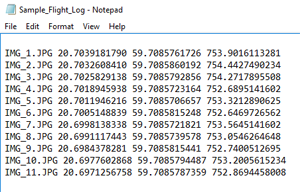
A sample of a Name, Lon, Lat, Alt (character-separated) trajectory file format with space-separateded values:
See also:
- Read more about coordinate systems click here